
In cybersecurity, keeping up with threats and attacks can be a constant challenge for organizations and their security teams. Threat intelligence (TI) analysts often spend long periods collecting data from various sources, connecting threat feeds, and preparing briefings, only to find that by the time their report is delivered, the situation may have already changed.
The description above highlights the background of why the Microsoft Security Copilot Threat Intelligence Briefing Agent exists and was initially created by Microsoft.
Introduction
Currently in public preview, the goal of this AI agent is to tackle one of cybersecurity’s most persistent challenges: delivering timely, actionable, and contextually relevant threat intelligence at the speed of business.
The agent utilizes the following data sources (plugins) in the Microsoft ecosystem to create the report:
- Microsoft Threat Intelligence
- Microsoft Defender External Attack Surface Management (optional)
- Microsoft Defender for Endpoint collected Threat and Vulnerability Management data (optional)
That being said, to get the most out of the AI agent, it is best suited for organizations that have turned on Microsoft Defender External Attack Surface (EASM) and Microsoft Defender for Endpoint for TVM data, as the agent relies on signals and insights from these first-party integrations to deliver accurate and context-rich reports.
Pre-requisites and Deployment
At the time of writing, the agent is in public preview. As a prerequisite, you need to have a user account with permission for reading TI & EASM data that the agent will use. My recommendation is to create a dedicated user account to Entra for this purpose, for better auditing and tracking, for example, SC-TIAgent@tenantname.onmicrosoft.com.
Summary of all prerequisites:
Microsoft Security Copilot Foundation
- Security Copilot up and running
- Security Compute Units (SCUs): Minimum 1 SCU required ($4/hour)
Identity & Access Requirements
- User Account Connection: Agent requires a connection to an existing user account identity
- Role-Based Access: Owner or Contributor permissions to the SC
- Read permissions for EASM and TVM data
- EASM data can be read through the SC plugin, and the Security Reader in Entra is a good candidate. It covers TVM data as well.
Required Plugins in SC
- Microsoft Threat Intelligence: Mandatory plugin for agent operation
- Microsoft Defender External Attack Surface Management: Optional but recommended for enhanced context
- Microsoft Defender Vulnerability Management: Optional – provides additional internal vulnerability insights for E5 organizations
More details in Microsoft Learn.
TI Agent Interface – Standalone Portal
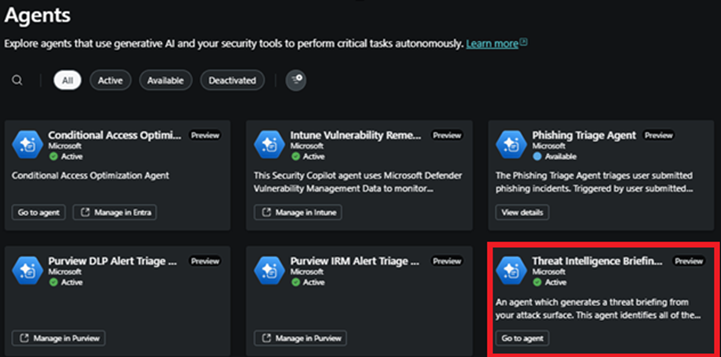
TI Agent is only available in the SC standalone portal. The configuration starts in the SC standalone portal. From there, select ‘Agents’ and then choose the Intelligence Threat Briefing agent (go to agent) as seen below.
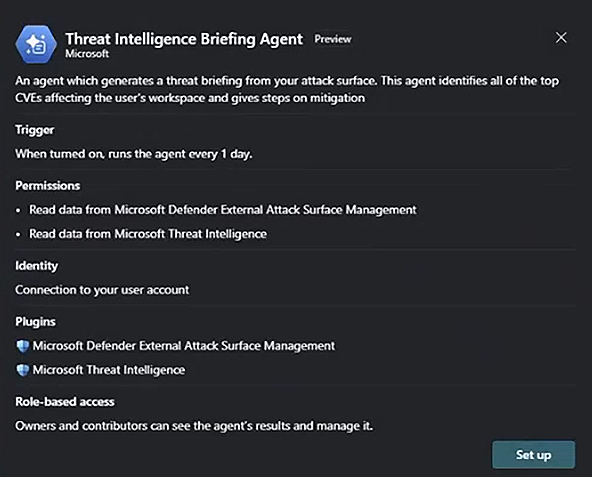
If the Threat Intelligence Agent is opened for the first time and hasn’t been configured yet, the configuration blade opens.
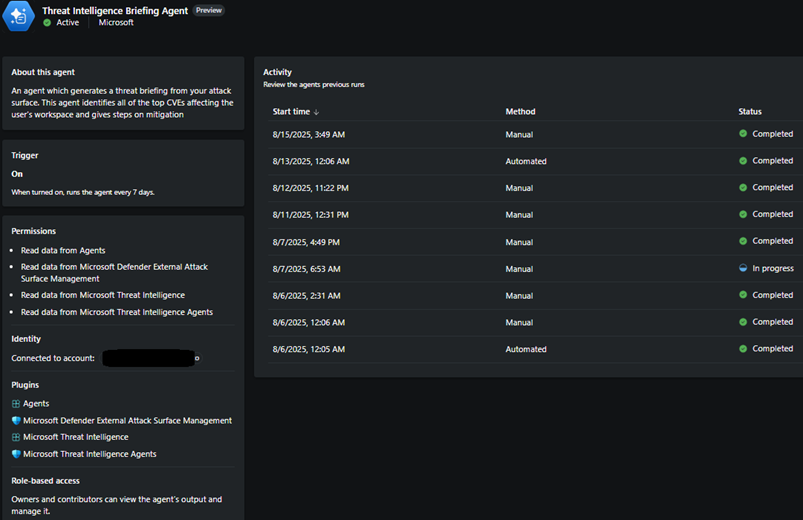
When opening the agent blade in the SC after the agent has been set up, a SC admin or contributor can view agent information, including its configuration, the account context it’s running under, and its activity.
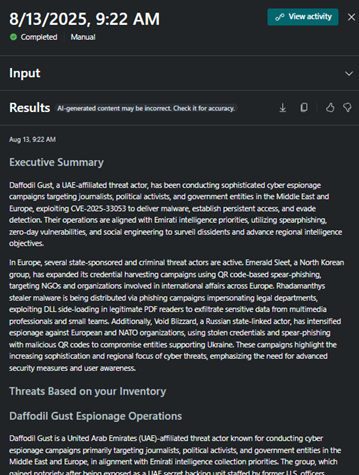
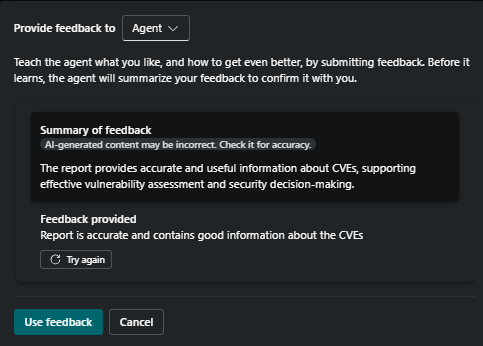
By selecting any of the activities from the activity blade, security team members (or those with the necessary permissions to the SC – Owner or Contributor) can access the report created by the agent for that specific run. From here, you can also send feedback to the agents, which is a crucial step to make it better next time.
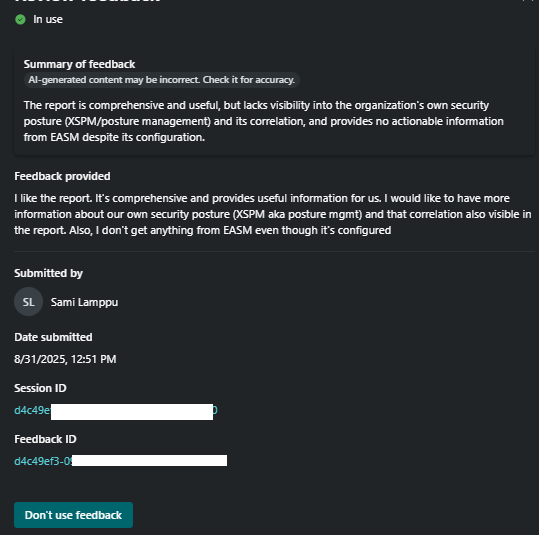
Memory management holds information about the given feedback, as seen in the Figures below. When the feedback is written, it is first summarized by Copilot before being sent to the solution. If you no longer want to use feedback in the later stages, it can be removed from the agent usage in the memory management section.

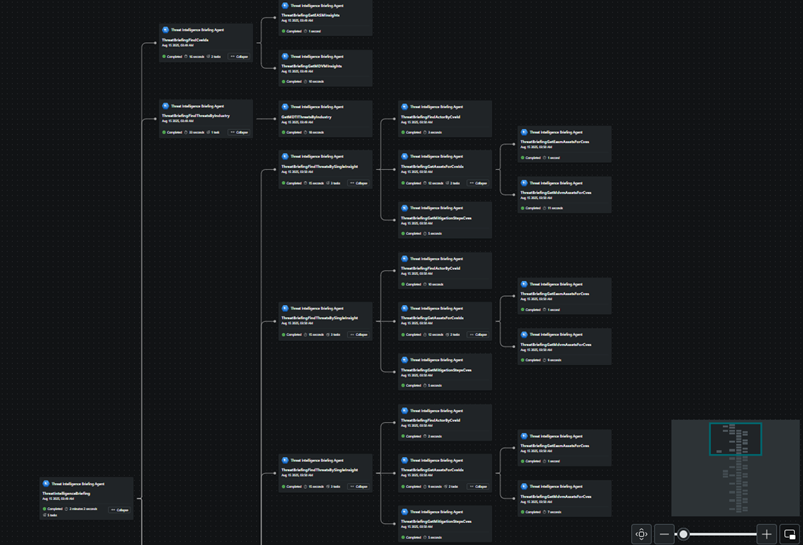
The activity map, available in the View Activity section at the top right corner, provides details about how the agent processed the flow and data. In a larger environment, where optional plugins are used, the process can be more complex, as illustrated in the Figure below.
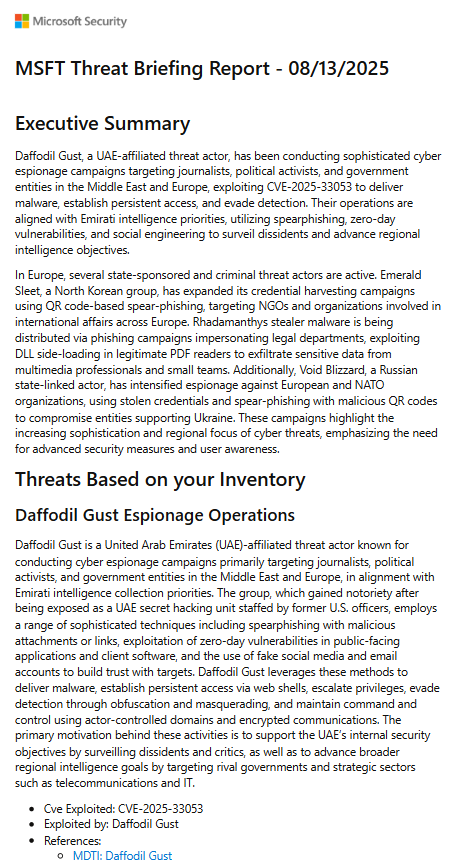
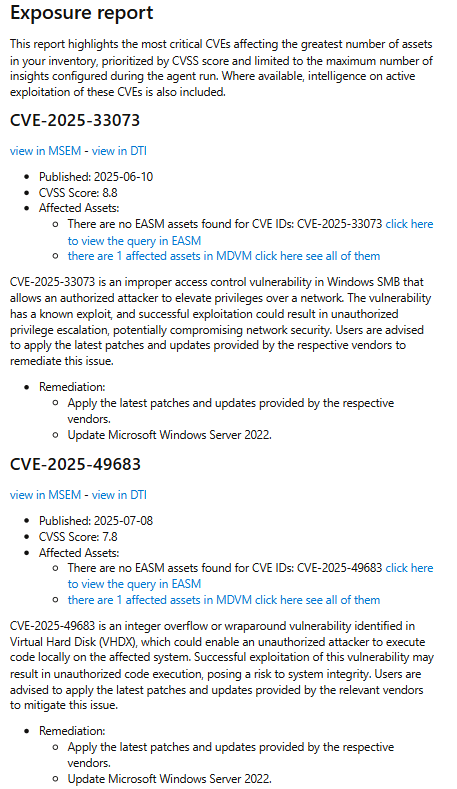
The agent enables the distribution of reports directly via email to designated stakeholders, eliminating the need for portal access or additional training. This function ensures that critical threat intelligence is delivered promptly, enabling decision-makers to make informed security investments, implement policy updates, or initiate incident response measures before potential threats develop into active security incidents.
Through this capability, the agent ensures that decision-makers have timely access to intelligence needed to guide security investments, implement policy changes, and initiate incident response actions before potential threats escalate into security incidents.
Audit Trail for TI Agent – What’s Available?
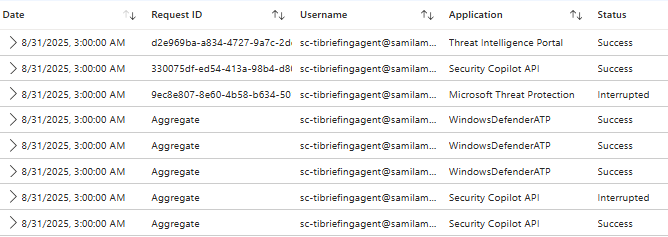
Last but not least, let’s look at audit trails; what insights can we gain from agent activity in security solution logs? Even if the agent is only reading data, I want to track its actions. With the growing attack surface involving AI agents, I want to ensure that if my agent entity becomes a target for adversaries, I can detect it and find evidence in the logs.
Microsoft Entra
Entra holds login information (obvious). The agent uses a standard user identity, and the sign-in must be refreshed every 90 days. Also, PIM/TAP cannot be used with the account because it will cause agent runs to fail. That being said, it’s crucial to monitor the account activity in general and verify that there isn’t any suspicious logins, additional roles, etc added to the account.
Microsoft Defender for Cloud Apps
Defender for Cloud Apps has a Security Copilot audit trail (Microsoft 365 Copilot chat app – id: 53016) that also holds Security Copilot activities. These don’t provide so many details about the activities, but at least you can see when your agent is connecting to the security solutions, and the scope is what it should be.
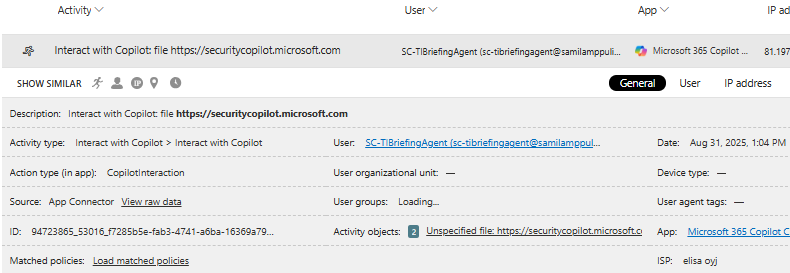
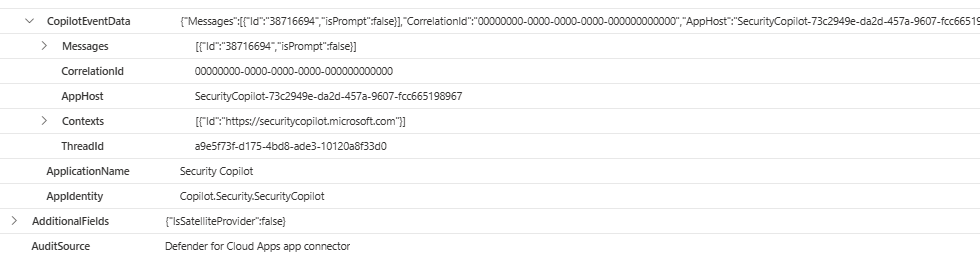
The same information, as shown in the MDA audit trail, is also available through advanced hunting in Defender XDR in the CloudAppEvents table. The short code snippet below displays all activities from the Security Copilot app associated with the identity configured for my TI Agent.
CloudAppEvents
| where ApplicationId == '53016'
| where ActionType == 'CopilotInteraction'
| where AccountObjectId == 'c6540346-6aec-4a93-94c6-f3586d2cdffa'
| sort by TimeGenerated desc
MicrosoftGraphActivityLogs
Microsoft Graph Activity Logs provide information about API calls in the ecosystem. Bert-Jan Palais has done some extensive research on the topic, and I highly recommend reading his deep dive blogs (here and here) about leveraging both ‘MicrosoftGraphActivityLogs’ and ‘GraphAPIAudit’ log sources.
Below is a few queries from Bert-Jan’s blog where I added Agent UserId along the game for better tracking and filtering. By doing so, I can track activities by this individual user.
This query enriches the GraphAPIAuditEvents with Application information from the AADNonInteractiveUserSignInLogs table to get more context in the results. In the first one, I added the applications (ApplicationId) to the query that are usual suspects for this TI agent.
let ApplicationName = AADNonInteractiveUserSignInLogs
| where UserId == "<Insert agent account ObjectId here>"
| where TimeGenerated > ago(1d)
| summarize arg_max(TimeGenerated, *) by ResourceIdentity
| project-rename ApplicationName = ResourceDisplayName
| distinct ApplicationName, ResourceIdentity;
GraphAPIAuditEvents
| where ApplicationId has_any ('bb3d68c2-d09e-4455-94a0-e323996dbaa3', '478d8d1a-326f-49da-a58e-8f576faa4b5e', '8ee8fdad-f234-4243-8f3b-15c294843740', 'fc780465-2017-40d4-a0c5-307022471b92', '73c2949e-da2d-457a-9607-fcc665198967')
| lookup kind=leftouter ApplicationName on $left.ApplicationId == $right.ResourceIdentity
| project-reorder ApplicationId, ApplicationName
On the other hand, I want to have information from all API calls made by this users. I can establish that one with the second query that enriches the MicrosoftGraphActivityLogs with user information from the IdentityInfo table to get more context in the results.
GraphAPIAuditEvents
| where AccountObjectId == "<Insert agent account ObjectId here>"
| lookup kind=leftouter (IdentityInfo
    | where TimeGenerated > ago(1d)
    | summarize arg_max(TimeGenerated, *) by AccountObjectId
    | project AccountObjectId, AccountDisplayName, AccountUpn)
    on $left.AccountObjectId == $right.AccountObjectId
| project-reorder AccountDisplayName, AccountUpn, RequestMethod, RequestUri
Critical Assets
One alternative method to enhance protection for the identities used in Microsoft Security Copilot AI agents could be to systematically incorporate these identities into Defender XDR’s critical assets framework.
By leveraging Defender XDR’s critical asset organizations could get the following benefits:
- Priority-Based Alert Triage through system tags.
- Critical assets are highlighted in device inventory with criticality levels, advanced hunting queries, attack path analysis, and incident correlation systems.
- Critical assets are incorporated into the Enterprise Exposure Graph, which stores comprehensive asset information across multiple workloads and extends into Defender XDR’s advanced hunting schemas through ExposureGraphNodes and ExposureGraphEdges tables.
- This integration enables sophisticated query capabilities that correlate critical asset activities with threat intelligence, enabling proactive threat hunting focused on protecting the most valuable organizational resources.
- The Attack surface map visually indicates critical asset status through halo colors and crown indicators, helping security teams identify choke points and exposure risks that specifically threaten essential business operations.
- Critical asset involvement in attack paths receives enhanced analytical focus, enabling teams to understand how adversaries might target crown jewel resources and implement preventive controls accordingly.
This approach enables security operations teams to establish specialized baselines for agent behavior, implement advanced analytics that can distinguish between legitimate autonomous operations and potential compromise indicators, and integrate agent security monitoring into Defender XDR’s broader threat landscape analysis, while ensuring that any threats targeting these critical automation assets receive the same priority response as attacks against domain controllers, critical servers, or other essential infrastructure components within the organization’s security ecosystem.
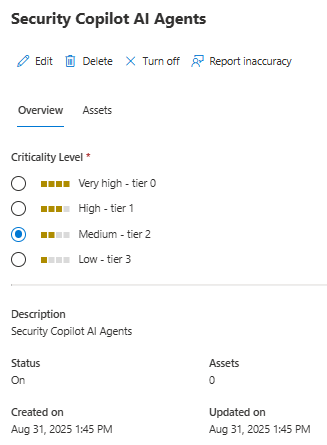
If you want to list all critical assets from the environment, you can use Defender XDR advanced hunting and KQL below for it.
// Query to get all assets with criticality level > 0
ExposureGraphNodes
| where NodeProperties has "criticalityLevel"
| extend CriticalityLevel = toint(NodeProperties.rawData.criticalityLevel.criticalityLevel)
| extend RuleBasedCriticalityLevel = toint(NodeProperties.rawData.criticalityLevel.ruleBasedCriticalityLevel)
| where CriticalityLevel > 0 or RuleBasedCriticalityLevel > 0
| extend CriticalityDescription = case(
    CriticalityLevel == 0 and RuleBasedCriticalityLevel > 0, "Rule-Based Critical",
    CriticalityLevel >= 3, "Critical",
    CriticalityLevel == 2, "High",
    CriticalityLevel == 1, "Medium",
    "Unknown"
)
| extend RuleNames = tostring(NodeProperties.rawData.ruleNames)
| project NodeId, NodeName, Categories, NodeLabel, CriticalityLevel, RuleBasedCriticalityLevel, CriticalityDescription, RuleNames, NodeProperties
| sort by CriticalityLevel desc, RuleBasedCriticalityLevel desc, NodeName asc
Summary
The Threat Intelligence Briefing Agent delivers optimal value for organizations that have deployed Microsoft Defender External Attack Surface Management (EASM) and Microsoft Defender for Endpoint (MDE), as the agent leverages telemetry and security signals from these integrated platforms to generate comprehensive, contextually relevant reports.
Organizations with these solutions in place benefit from enhanced threat correlation capabilities, where the agent can map external threat intelligence against their specific attack surface and endpoint security posture.
Without these integrations, the agent operates with a limited organizational context and may produce generic threat briefings that lack the specificity needed for actionable security decision-making. The combination of external attack surface visibility and endpoint telemetry enables the agent to prioritize threats based on actual organizational exposure, rather than relying on general industry trends.
References
- Microsoft Learn intro to TI Agent: https://learn.microsoft.com/en-us/copilot/security/threat-intel-briefing-agent
- Bert-Jan’s blog about Microsoft Graph: https://kqlquery.com/posts/graphapiauditevents/
 Sam's Corner